Introduction
Funnel Insights help you understand how users progress through a specific process in your application. A Funnel is made up of a series of sequential events, such as Flow steps, User Actions, Autocaptured events (Beta), or Page Views, that represent the path an end user takes while completing a task. For more information on how Funnel Insights work, see Understand Funnel Insights.
By analyzing Funnel Insights, you can:
Understand how users navigate through a process
Identify steps with the highest drop-offs
Measure completion rates and the time taken between steps
Find opportunities to reduce friction and improve user experience
Info:
As a prerequisite to creating Funnels, ensure that sequential User Actions, Autocaptured events (Beta), Flow steps, or Page view events exist for the process you want to track.
Types of Funnel Insights
There are two types of Funnel Insights that you can create.
Conversion Funnel:
Conversion Funnels help you understand how end users interact with a product or feature for the first time. These Funnels track the journey from when users discover a feature to when they complete or exit the process. Use Unique users to measure Funnel Insights for these one time journeys, as each user is counted only once.
Example: In e-commerce applications, Conversion Funnels help you understand the customer's journey from the time they view a product until they purchase it.
Productivity Funnel:
Productivity Funnels help you determine the shortest time taken by end users to complete a process. These Funnels help you identify steps where users spend too much time and highlight bottlenecks that reduce productivity. Use Total attempts to measure Funnel Insights for these repeat workflows, as it captures every attempt within separate sessions.
Example: This is useful in applications where optimizing task efficiency impacts revenue or operational cost, such as CRM systems, call centers, or claims-processing tools.
Funnel setup
When configuring Funnel Insights, you can set how user progress is measured using the following options:
Total attempts
Counts every attempt a user makes to complete the Funnel steps in a session. Every time a user completes the first step of the Funnel in a new session, it is counted as a new attempt.
Use cases:
Use this Funnel Insight to analyze:
Measure how many attempts users take to complete checkouts or form submissions within a single session.
Identify Funnel steps where users repeatedly encounter errors or validation issues before successfully proceeding.
Create a cohort of users with a low attempt-to-completion ratio on Funnel steps to identify those experiencing high friction.
Identify the specific Funnel steps where users drop off within a session after multiple failed attempts to complete a task.
Unique users
Counts individual users that complete the Funnel steps in sequence on their first attempt. Even if the user interacts with the Funnel steps multiple times, they are counted only once as a unique user. This helps understand how many unique users complete each step of the Funnel.
Use cases:
Use this Funnel Insight to analyze:
Measure how many unique users complete an onboarding Flow.
Determine the number of new users in an application who complete a Task List.
Measure the overall completion rate of the process within different user groups.
Info:
By default, Funnel Insights are set to track Total attempts. Switch to Unique users to count each user only once instead of multiple attempts within sessions.
For more information on the Funnel logic for both Unique users and Total attempts, see Understand Funnel Insights.
Whatfix enables you to choose only one mode at a time.
Whatfix enables you to analyze the following as a Funnel Insight:
Flows provide step-by-step guidance that enables your end users to complete a process.
Custom events include all events you configure, such as User Actions, Autocaptured events (Beta), or events captured using the Whatfix API.
Page view enables you to add the exact URL of a page to understand how many users are visiting the page. The URL can serve as the origin of the Funnel or the URL to which a user is redirected when interacting with a Flow or User Action that is part of the Funnel.

Info:
Whatfix enables you to create Funnel Insights with just Page views as well. This helps you analyze end-user behavior by adding sequential pages that show a specific path an end user takes in an application.
Benefits of Funnel Insights
Identify drop-off points and reduce friction in key workflows
Measure conversion rates to validate feature adoption
Track time-to-complete between steps and optimize efficiency
Funnel View
The Funnel View provides a visual representation of how users move through each step in the process. It highlights conversion patterns, drop-offs, and the time taken between steps.
Use the insights gathered from the Funnel to create targeted Whatfix guidance content or product improvements that reduce drop‑offs and shorten completion time. For more information, see Create Cohorts from Funnel Insights.
Visualization
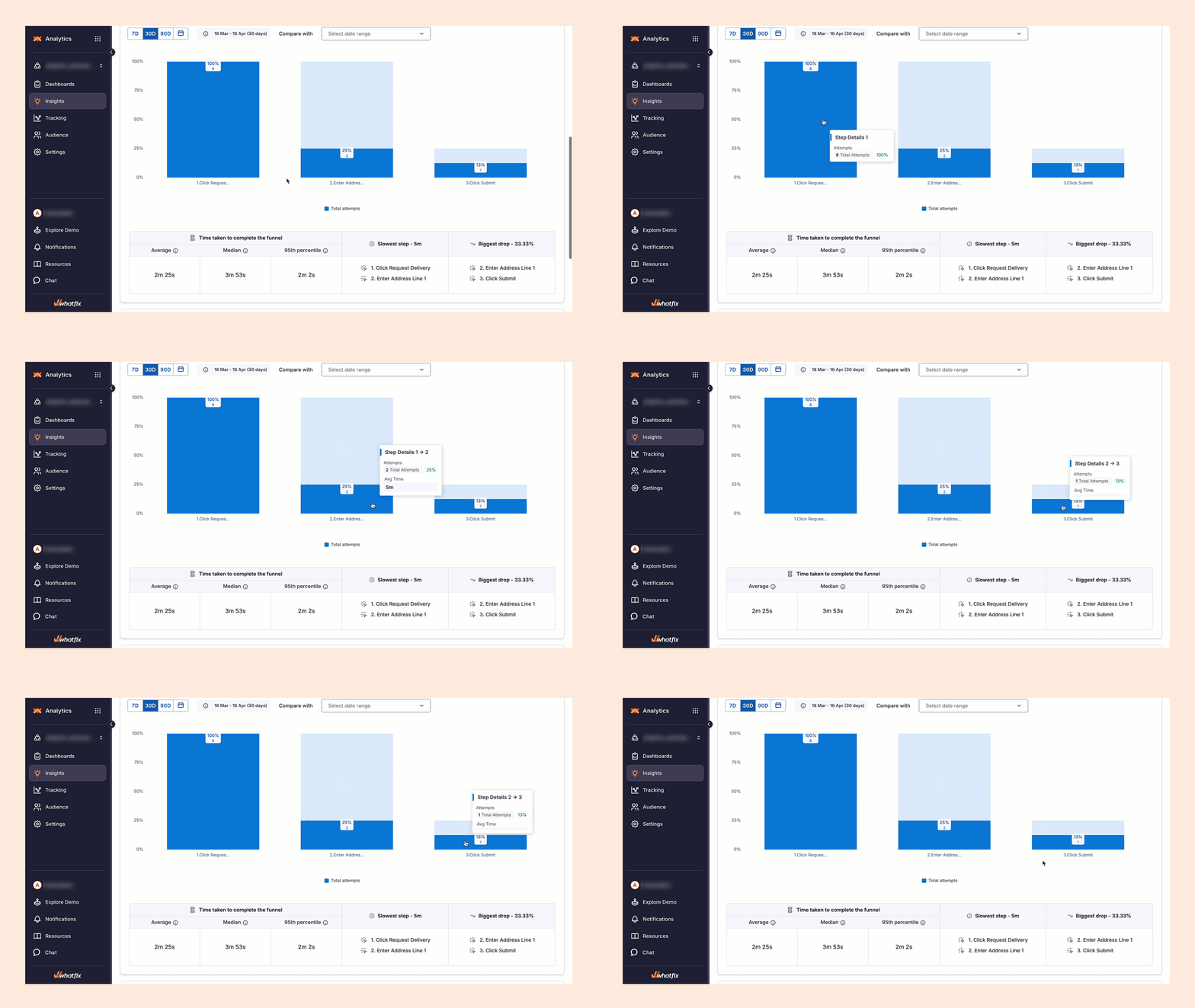
The Funnel View uses a bar-based chart to illustrate the Total attempts progression:
The first bar represents the total number of attempts made by users to enter the funnel.
Each subsequent bar shows the number, average time, and percentage of users who continued to the next step.
The light-blue background bars display users who reached the step but did not proceed.
Bar heights enable quick comparison of conversions between steps.
The Funnel View uses a bar-based chart to illustrate Unique users progression:
The first bar represents all unique users who entered the Funnel.
Each subsequent bar shows the number, average time, and percentage of users who continued to the next step.
The light-blue background bars display users who reached the step but did not proceed.
Bar heights enable quick comparison of conversions between steps.

Step-level insights
Hover your cursor over any bar to view the following details:
Total attempts to progress from one step to the next
Average time taken between the steps

Number of users who dropped off
Drop-off percentage

Hover your cursor over any bar to view the following details:
Users who progressed from one step to the next
Average time taken between the steps
.png?sv=2022-11-02&spr=https&st=2026-05-12T09%3A04%3A33Z&se=2026-05-12T09%3A19%3A33Z&sr=c&sp=r&sig=rxKN096YIR8r79n6Am6saN2Fwe2cxrONekXmT9%2F5UIU%3D)
Number of users who dropped off
Drop-off percentage
.png?sv=2022-11-02&spr=https&st=2026-05-12T09%3A04%3A33Z&se=2026-05-12T09%3A19%3A33Z&sr=c&sp=r&sig=rxKN096YIR8r79n6Am6saN2Fwe2cxrONekXmT9%2F5UIU%3D)
Funnel Summary
The Funnel Summary displays:
Average time
Median time
95th percentile time
Slowest step
Step with the biggest drop-off

For more information on the Funnel Summary, see Understand Funnel Insights.